TL;DR: This blog post discusses why our investments in hardening Ketchbrook Analytics’ security posture are allowing us to run faster with Agentic AI. It provides principles that extend beyond software development and can be useful for any organization and/or line of business.
While the news cycle might have you believing that AI is transforming every aspect of business these days, perhaps the industry where it’s actually having the biggest impact is software developers — people like us at Ketchbrook Analytics.
I’ve been skeptical of AI in the past, but sometime in the beginning of 2026 I turned the corner into fully embracing how AI can help make Ketchbrook better. To put it simply, we’re able to do more of the following, in the same amount of time, with the same headcount, and (most importantly) same level of quality:
- Write more code
- Improve documentation
- Fix bugs faster
- Ship new features
One of the main reasons why I’ve softened in my hesitation around agentic AI is the security investments we’ve put around it. These guardrails are allowing us to dive head-first into agentic AI in a way that helps me sleep at night1. While some of the technical considerations detailed in this post may be outside the scope of what’s technologically applicable to you and your organization, I’m hoping that you may find the concepts useful as you navigate your agentic AI journey.
What Exactly is “Agentic AI”?
The scariest part of agentic AI is the fact that you’re giving it access to execute commands on your own computer or systems – which, by definition, is what makes it “agentic”. This is in contrast to simply using the ChatGPT/CoPilot/etc. interface to ask questions and get answers back. Agentic AI can do things like change the content of your files, run software programs, list all of the files on your computer (and their contents), and so on.
Agentic AI is incredibly powerful and useful. It’s also incredibly dangerous, particularly in terms of the possibility of PII leaving your laptop and/or network.
Lines of Defense
AI is clearly going to make hacking easier for bad actors. You don’t need to look any further than the recent news around Mythos to see why.
While we can try to stand up every security protocol under the sun in our IT environment, I think an equally important step is to reduce our PII footprint as much as possible, so that if the worst-case scenario happens and we do get hacked, there’s nothing exciting for them to take.
At Ketchbrook, we’re implementing four lines of defense to protect our proprietary information (and that of our clients’) so that we can safely run full-steam-ahead with agentic AI.
First Line: Get PII off of Local Machines
We’ve recently adopted Bitwarden Secrets Manager to keep credentials off our local machines entirely. Previously, every developer on our team had a sprinkling of .env (for Python projects) and .Renviron (for R projects) files2 scattered across their projects. These files were gitignored, but still sitting on disk as plain-text credentials. Our information security policies require us to self-audit every 30 days and remove these types of files (along with sensitive project data) from our machines for any inactive projects, but this requires manual effort from each team member.
With BitWarden Secrets Manager, these secrets live in Bitwarden3 and get pulled into our development environments at runtime, where they exist only in memory. If a laptop is compromised, there are no API keys or database credentials sitting around on the filesystem for an attacker to grab. Further, shutting off access to all secrets a developer on our team has access to is a single click in the BitWarden Secrets Manager UI – contrast this to requiring them to manually search across all projects on their local filesystem and delete the .env and .Renviron files one-by-one.
How can you reduce the amount of PII available to any single user, so that if they got hacked, there wouldn’t be much for the attacker to find on their hard drive?
Second Line: Containerized Development
It’s been over two years since we embarked on our journey of containerized development for every project. With our containerized approach, Claude Code (our agentic AI coding assistant of choice) can’t “see” anything outside of the project folder I’m working in.
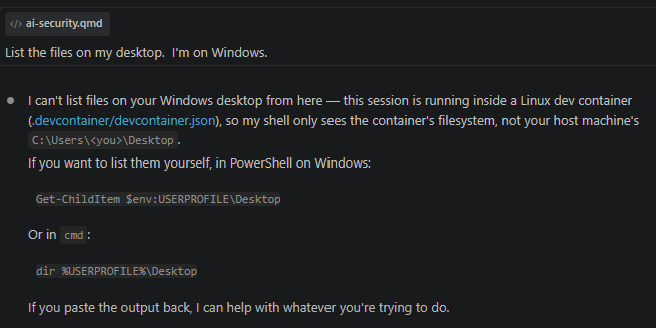
This ensures that any commands the agent executes will not change any files or programs outside of the project at hand. Anyone who has used Claude Code or Codex locally (i.e., not inside of a container) has likely experienced the agent suddenly searching across your entire filesystem because your prompt wasn’t specific enough or the agent couldn’t ground itself on where to look for an answer to your question, so it decided to look everywhere.
How can you limit file access for individuals at your company to only what they need to do their jobs? Do you consistently store a ton of files on a shared network drive that essentially everyone has access to? Can you narrow the environment that people work in on a daily basis to reduce your security footprint if someone at your organization is compromised?
Third Line: Agent Settings
Claude Code allows you to place a settings.json file in any project. This file enables you to allow or deny Claude access to specific files or “tools” (i.e., commands it can run). You can also configure these settings at a higher level — either on your laptop to govern all the projects on your machine, or your Claude Code admin can configure these settings organization-wide.
For non-developers experimenting with agentic AI in your organization (this probably means CoPilot4), make sure you’re aware of how you can configure your agent of choice to allow/deny access to different files, folders, and commands on your own machine. This would be a great conversation to have with the IT admin who’s in charge of managing that AI product.
Fourth Line: Our Enterprise Claude Code subscription
Anthropic boasts SOC/ISO compliance and defaults to not training their models on your input data (which is different from not storing your input data at all). Theoretically, the information we put into these models shouldn’t end up anywhere besides Anthropic’s secure databases. However, I’d rather not even take that risk; hence why this is our last line of defense.
That being said, I’m not sure there’s a bigger target for hackers these days than Anthropic and OpenAI. Hopefully they are staffing up accordingly.
This one probably goes without saying, but make sure the frontier-model AI agents in use at your organization have been appropriately vetted by your third-party risk management department.
The Future of Data Science Consulting
It’s pretty clear to me that Ketchbrook will have to modify our business model sometime in the near future. How much will it change? I’m not sure.
Agentic AI is already impacting adjacent industries, such as data science curriculum/training firms5.
I’m confident that the need for experienced data scientists/engineers will still exist in the long term. It’s one thing to be able to have Claude/ChatGPT/Gemini spit some code back to you; it’s another thing to:
- Understand if that code solves your business problem and handles all of the relevant edge cases
- Deploy and host that code somewhere where it can be useful to others and interact securely with your data,
- Maintain that code as business requirements evolve over time and the codebase grows into something you understand less and less with each new line your agent adds
In my opinion, there’s also no one better to coach (i.e., prompt) an AI agent to get exactly what you need from it than a seasoned data scientist or data engineer who can think through all of the architectural considerations that need to be communicated to it. At Ketchbrook, we’re already engaging in some projects where we’re doing more SKILLS and prompt engineering work than we are writing code. In our perfect world, we’ll continue to do a mix of both for a long time.
When it becomes clearer to me what future looks like for us, I’ll update you here.
Footnotes
As a founder whose background is in risk management, this isn’t an easy thing to accomplish.↩︎
These files are typically used to store “secrets” such as database connection information, API keys, passwords, etc.↩︎
If you’re not familiar with it, Bitwarden is similar to LastPass, 1Password, and other password managers.↩︎
I’m sorry.↩︎