Introduction: The Data Accessibility Challenge
Have you ever wished that you could ask your data questions in plain English?
At Ketchbrook Analytics, we made this a reality for our clients – and it’s completely changed the way they consume data. In this blog post, we have decided to peel back the curtain on our journey to building this solution, which we are coming up on the 1 year anniversary of launching. We’ll share what worked well, what didn’t, and why the end result has been so successful.
The Spark: Why Text-to-SQL, Why Now?
The rush to incorporate AI into existing products is visible everywhere. If you see through some of the marketing hype, however, you’ll realize that not all products or projects make sense for an AI infusion. At Ketchbrook, we pride ourselves on being honest with our clients regarding which use cases can benefit from AI – and which can’t.
Our Farm Credit Call Report Dashboard was one of those use cases that could leverage AI to provide an even better experience for our users. We set out to build an interface within the dashboard where users could submit plain-English “prompts” (i.e., questions about the Call Report financial data) and receive the data they asked for immediately on-screen.
The Expedition: Navigating the Development Landscape
Core Architecture
Our first step was to research the State of the Art (SOA) in Text-To-SQL and implementation schematics (and we encourage you to do so as well if you plan on following our steps, as SOA is advancing rapidly nowadays). For large databases, many solutions basically tend to go something like this:
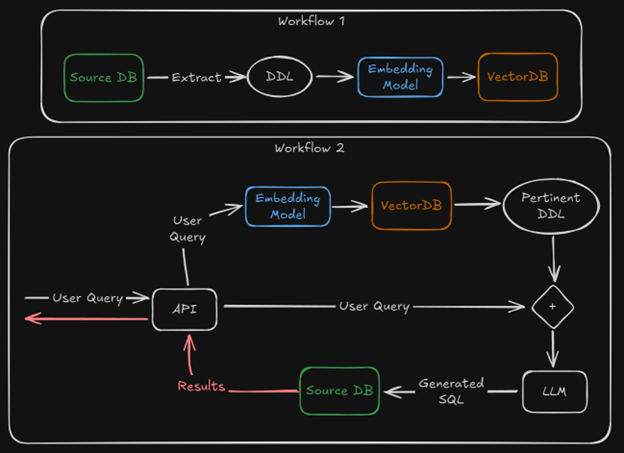
First, you’ll need to set up a workflow that extracts the source database’s schema (tables, columns, keys, joins, etc.) and as much metadata as possible. We’ve named it “DDL” (Data Definition Language) in our graph above, since most of the output of that process is comprised by DDL statements. The workflow then splits the DDL into smaller chunks and runs those chunks through an embedding model (which turns text into numbers) then saves the embedded result in a vector database.
We can also automate this workflow so that it can continuously run on a set schedule to keep the vector database up to date (i.e., so that user questions are as relevant as possible with respect to changes made to the source database over time).
The next step is to set up a second workflow that leverages the vector database created in the first workflow. Once the user prompt is received, we must develop a pipeline to retrieve the pertinent DDL that should accompany it as context for the LLM. To do so, we embed the query and use semantic/hybrid search in our vector database to get the information that would help us answer the user’s question (i.e. if the user prompt is “How many employees do we have?”, we’ll likely need information about the “Employee” table in the source database).
Both the initial user query and the pertinent DDL are then fed to the LLM as a prompt, as well as our request that the LLM return SQL code that can answer the query. The LLM spits out our SQL, we execute it against the source database, fetch the results, and display them to the user.
Hopefully this initial framework we’ve described helps set the stage, but there are certainly many more questions to answer: Which LLM should I use? Which embedding model? Which Vector DB? Where will I stand all of this up? What are the hardware requirements? The cost? If we are depending on RAG, how consistent will the performance be? And many more questions that you may already be asking yourself.
Choosing the Engine
When talking about LLMs there are always two clear paths available:
- Use a third-party (OpenAI, Anthropic, Google)
- Self-host with open-source models (Llama, DeepSeek, Gemma)
The second option (self-hosting your own LLM) gives you total control over cost and privacy. You know exactly what goes in and out, what gets stored and what doesn’t, where that storage is, and what other services/networks you let it communicate with. You can also use it as much as you want without worrying about running out of credits, running up a large bill, or dealing with vendor outages/downtime.
The downsides to self-hosting include cost and setup complexity. Hosting an LLM typically requires beefy hardware, and that can be expensive – especially if you are running it 24/7. It will also likely increase your latency because the costs of using a big enough server that responds in a second or two seconds instead of five or ten seconds can be prohibitive.
A second minor downside to self-hosting is that third-party models tend to be the “best of the best”, while self-hosting relies on using open-source models that are slightly behind the latest third-party offerings.
All mentioned downsides for self-hosting are of course, upsides for the using third-party models. With third-party LLMs, you only pay for what you use (which can be as cheap as $0.01 per prompt/query). They tend to send back quicker responses because they are backed by massive data centers.
The main drawback for most organizations considering using third-party LLMs is the lack of ensured privacy. While many of the third-party vendors in this space offer paid subscriptions that come with “privacy-ensured” SLAs, most of these same vendors trained their models on copyrighted data (on everything they could get a hold of, really), which has raised significant ethical and legal concerns. Many firms we work with to stand up self-hosted LLM solutions appreciate the certainty that whatever they send to their model will not leave their environment.
Overcoming Dragons: Challenges and Solutions
Challenge 1: Performance and Cost
Problem
Of course, the first problem is directly related to what we’ve just been talking about. Third party or self-host?
Solution
After initially pursuing a self-hosted approach, we quickly switched to a third-party LLM; primarily because the information that we would be exposing to our LLM was publicly available data. Further, it’s important to remember that the information we expose to the LLM was limited to only the schema of the source database; not the data in the database itself (i.e., we only provided metadata). Using a third-party model helped reduce both latency and cost.
For the specific third-party model, we chose Anthropic’s Claude, as we have consistently found it to be the best LLM for generating accurate SQL code from plain-English prompts. You should do your own research on models (and prices and rate limits) at when choosing one, given that the rankings change almost weekly and it wouldn’t make much sense for me to recommend a specific one.
Challenge 2: Schema Complexity
Problem(s)
In our case, all of the table names and columns were uppercase. This was a database design decision based upon matching the convention used by the FCA in the published data. Anyone who has worked with Postgres as their database engine knows that Postgres is not a fan of uppercase characters. While not catastrophic, this dichotomy reared its ugly head in that all column and table references in our generated SQL query would need to be encased in quotes; should you forget to quote them, Postgres would have a fit. LLMs tend to like fuzzy inputs and fuzzy outputs. They are non-deterministic, and forgetting a quote here and there would not be odd. Plus, they are not trained specifically on Postgres so they might get confused along the way and use a flavor of SQL meant for Oracle or Microsoft, for example
Another challenge was that both table and column names were acronyms and initialisms. You can’t expect an LLM (or a human really) to know what ACTRTFV means out of the gate without any context. If you read ROI, you might think Return of Investment which is a very common usage, but it might also mean Region of Interest or Radius of Influence (less common, but also used).
Solution
Our solution to these problems was two-fold. First, we reduced the scope and replaced all necessary tables with a single view that had what we thought was the most important information for our users. This also greatly affected our initial solution architecture, as we now don’t really need RAG for the DB schema if it will only have a single view. This removed our issues with table names, number of tables and joins, but we still had uppercase column names to deal with.
To solve that last part, we developed a script that uses the column’s metadata to change the column names from say “ROI” to “return_on_investment”. This is much more readable for any human (and when working with LLMs, it is a good practice to explain everything as you would a person that has no context, they can’t know details of your circumstances otherwise) or LLM, and it also lets them know which column the user is referring to in natural language.
Challenge 2a: Aliases
Problem
Our solution from above generated another problem. Some users are very knowledgeable of the domain vocabulary, and it is normal for them to use the acronyms and initialisms in their queries to save time.
Solution
Add the known aliases for column names to the prompt’s context.
Challenge 3: Accuracy and Performance
Problem
A fair number of tests returned executable SQL that didn’t really answer our query, or misinterpreted it somehow. The performance was good, but not great, and not something that we’d be comfortable shipping to users.
Solution
Adding examples to the Prompt’s context window worked wonders on solving this issue. It gave the LLM a better sense of the underlying data, how to correctly interpret the users’ prompts, and what to expect.
The examples added were of varying SQL difficulty and contained a range of topics, but we tried to limit them somewhat. The objective is to add context but try to avoid the LLM just copying the example as-is; the user might want something similar but not exactly the same as the example we provided.
Pro Tip: In a solution incorporating RAG, you’ll likely want to pull examples for the table(s) selected during the vector search. Or inversely, get to the tables through the examples!
The examples contain a user’s natural language query and a resulting SQL query; they do not contain data.
Challenge 4: Filter columns
Problem
You’ll likely have columns that are prime targets for filtering. Some like dates and such don’t need extra work, but something like a specific company name might. Users can mistype (I do it alll the tiem), but the main issue is that they won’t likely type the field value exactly as it is saved on the database, especially if they don’t know how it was saved (and they shouldn’t have to!)
Your SQL query might need “The Grand Fishing Company LLC.” to use as filter, otherwise it won’t work. Users are likely to write “grand fishing” at best.
Solution
This is the only instance where we might share some of the underlying data with the LLM. Passing along a list of the available values for this type of field solves this issue to great effect, especially if you instruct the LLM to not deviate of that list. Users get the chance to mistype or partially complete as they like and the LLM will match with the correct one or do a best guess.
Challenge 5: Context window limitations
Problem
Context windows are finite and making them too big tends to result in bad performance. Nowadays most models accept a context window of about 120k tokens, but going over 32k starts making models unreliable with said context (at the time of writing, Google has launched a Gemini version that is supposed to accept 1M tokens as context and be surprisingly good with it, but we haven’t tested it yet) as you may run into the lost in the middle issue. This means that LLMs tend to pay attention to the beginning and end of the context, but not much to the middle of it.
There is also the issue of cost. If you are self-hosting your LLM, the cost is represented in latency and consumption of the available memory. Bigger context needs more RAM and so to handle a bigger context you also need beefier hardware, which is more expensive. If using a third party (like Claude), it translates directly into cost as they tend to charge by the number of inputted and outputted tokens.
Solution
Our solution to problem 2 greatly impacted this problem as well, as the resulting schema is small. We also spent a good amount of time prompt engineering to make sure we were efficient with our token usage while getting good performance, and we made sure the important parts of our instructions were at the beginning and end of our prompt.
We also decided to reduce the scope and make our tool translate single instances of queries. What I mean by this is that it will not work like chatting with ChatGPT where you have an interaction and the LLM remembers what you’ve been talking about. We have chat history added to the context, and it is a single-shot process. You input a natural language question; you get SQL and data as a result.
Challenge 6: Error handling
Problem
Even with temperature set to 0, the LLM might sometimes return an answer with SQL that isn’t executable. It can be a syntax error, a SQL function that is meant for a different database, or some other hallucination it decided to spit out.
Solution
First, trying to execute the query against the database generates latency, not only due to connecting to the service and sending the query to the engine, but also because on most instances the query is likely executable, and we need to wait for the engine to gather the result and return it.
We need a way to check right away if the query can be executed and not waste so much precious time. We decided to generate an empty copy of the database in the same instance as our backend. That way, it is extremely lightweight, and we don’t even ask for an execution, we just ask the engine to “prepare” or “compile” the SQL query. This step involves parsing the query and checking its syntax against the database schema without actually fetching or modifying data.
Then, if the results are bad, we capture the error and generate a second LLM call that contains some of the original context, the resulting query (the one we wanted to run and failed) and the resulting error, and we add instructions for it to attempt to fix it.
The Summit: Our Final Product & Key Capabilities
Our final solution is the “Chat” feature on our current Call Report Dashboard!
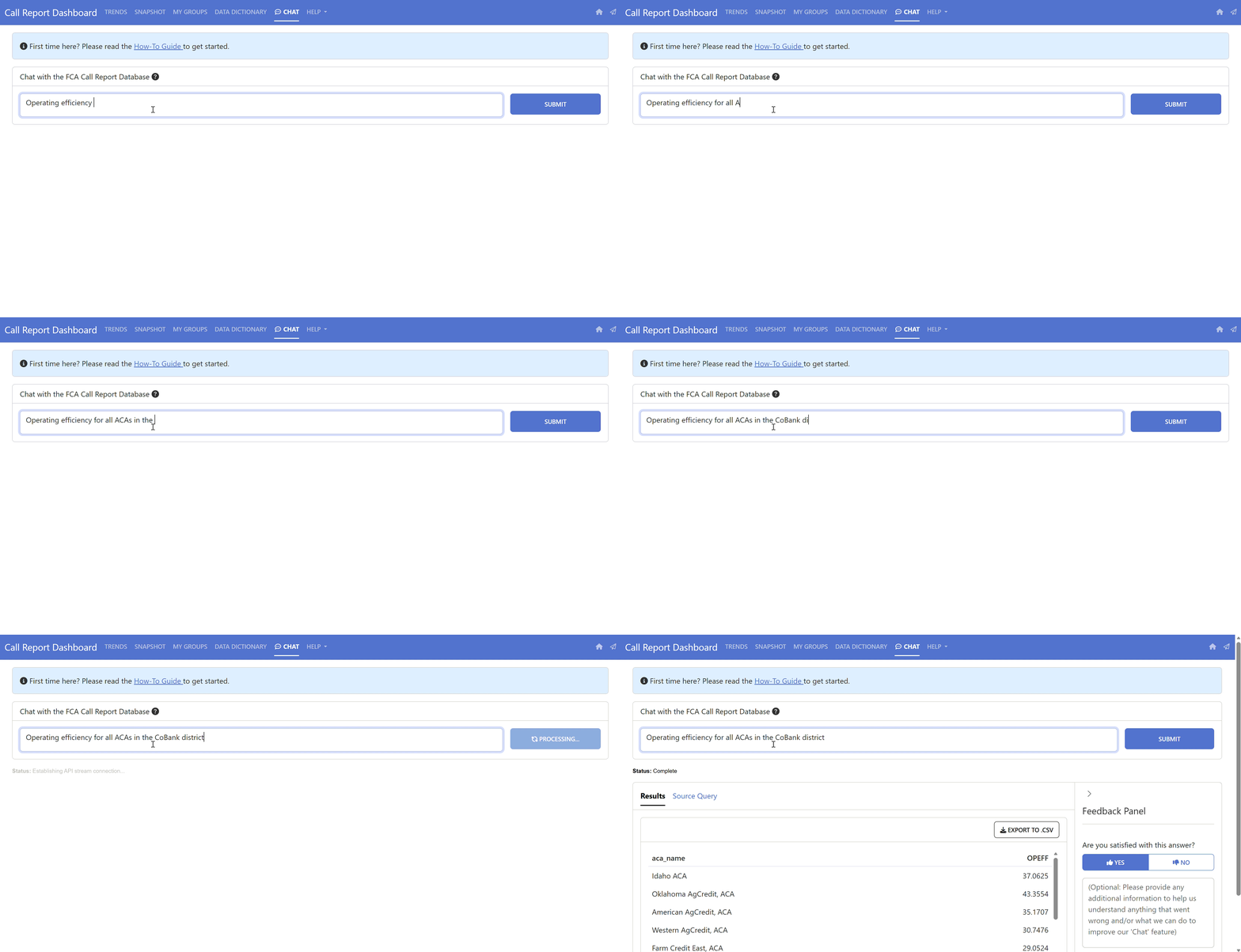
Note that this product is aimed at a specific audience – the Farm Credit System – as it contains financial information specific to that industry (i.e., it is highly adapted to this specific domain of knowledge).
We’ve added some instructions on a left pane so that non-technical users can get an understanding of how to interact with the tool and know what to expect out of it. It also lets them know what information is being collected as we are firm believers in transparency (we only collect the necessary information to help us improve the product and develop future versions).
You can now write something like “Show me the Operating Efficiency Ratio for the 10 largest ACAs” and get both the underlying SQL being executed and the resulting data in table format. We add the SQL so that the users may verify (by themselves or with their data/analytics department) that everything makes sense. We believe this is a necessary step to build trust in the tool, particularly if the information is being used to make important decisions.
It typically takes about 2 seconds at most to get the full response! Users also get the option of giving feedback, both by liking/disliking the result, and/or by writing down what the issue was that they encountered and clicking the “Submit Feedback” button.
View from the Top: Lessons Learned
Technical takeaways
- The two main things you need to define are:
- If you’ll self-host the LLM or utilize a third party API,
- How you’ll provide the necessary context for the LLM (mainly a DDL that is good enough for it to generate a good prompt)
- After that, keep in mind that:
- Adding examples helps the LLM understand what to expect in its interactions with users, what expected results should look like, and how it should go about interpreting your DDL (just like a human would do)
- Value lists for filter fields are a must. Users shouldn’t have to know the exact wording they need to use for a proper SQL query, and they should be able to mistype or make mistakes occasionally
- You need to plan for error recovery. LLMs are good at fuzzy input and fuzzy output, but we need non-fuzzy, structured, syntactically correct output. That means it might get it wrong sometimes and you must handle those situations to maintain an acceptable level of accuracy and performance.
- You’ll need to spend a good amount of time prompt-engineering. Testing and retesting prompts, creating both simple and complicated scenarios to make sure your solution is production ready.
Here is a short summary of how our prompt is currently structured as mentioned throughout several of the challenges previously described:
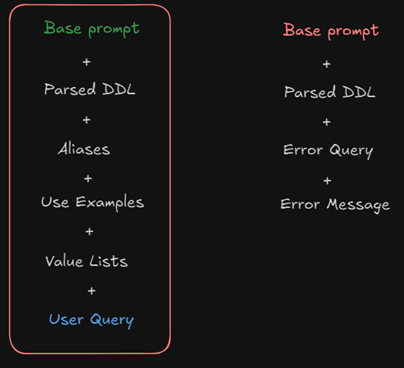
The first column is the ”happy path” and the other one is the error-recovery path (Base prompts are different, hence the difference in colour)
- Of course, selecting a good underlying LLM that suits your needs is also important, but nowadays many are good enough (they were rarer when we started our journey over a year ago, but they are advancing rapidly)
Project insights
- Ask for feedback from your users and involve them as soon as possible. Once we had something slightly sketched and partly functional, we gathered some key users and explained how we wanted to tackle this new feature. We showed how it would look, how it would respond, we made wireframes of the UI, we shared examples. They gave us example questions (prompts) that they would want to ask such a tool. We incorporated their valuable feedback into our final solution and it paid off in spades.
- Integrate a mechanism for feedback. User feedback from the usage of your product is most important and it should be easy for the user to give it, and for you to use it. Also, however possible, incentivize your users to actually provide you with feedback – simply making a place for them to provide feedback is often not enough.
- Log and save important data! You need to be able to generate performance metrics and a way to review the process and improve it; you can’t do that without data.
The power of LLMs
LLMs are constantly getting better, including improved ability to handle a wider range of tasks. Most notable current changes are involving Agents, which give LLMs the power to do stuff more than only respond with text/images/instructions.
Incorporating LLMs into products and services can generate big rewards and streamline many processes, but not everything should be solved with them. Be conscientious but incorporate them if you can do so in a way that provides value. We believe this is only the beginning!